> ## Documentation Index
> Fetch the complete documentation index at: https://docs.magna.so/llms.txt
> Use this file to discover all available pages before exploring further.
# How To Add & Deploy A Contract
> Create a smart contract for your token and deploy it on-chain using your admin wallet.
Adding a smart contract is a two-part flow: you **create** the contract (choosing its type and name), then **deploy** it on-chain. You can do both in one go, or create the contract first and deploy it later.
You'll need a token with an on-chain address and an [admin wallet](/admins/product-guides/magna-quickstart-guide/step-1-set-up-key-project-details/step-1c-how-to-add-admin-wallet) to deploy. The admin wallet you choose becomes the owner of the contract and signs its transactions.
## Create a contract
1. Go to **Settings → Token Distribution → Smart Contracts**.
2. Select the token you're creating the contract for from the dropdown at the top of the page.
3. Click **Create Smart Contract** (top right).
4. In the **Create Smart Contract** panel, choose a **Contract Type**:
* **Claim** — lock tokens in an escrow contract for stakeholders to claim.
* **Direct Transfer** — send tokens directly to recipients' wallets.
See [Contract types](/admins/product-guides/smart-contracts/contract-types) for the full explanation of each.
5. Enter a **Name** for the contract (optional, but recommended so it's easy to identify later).
6. If you want to deploy immediately, tick **Do you want to create an initialize transaction now?** and select the **Admin Wallet** that will own the contract.
7. Click **Create**.
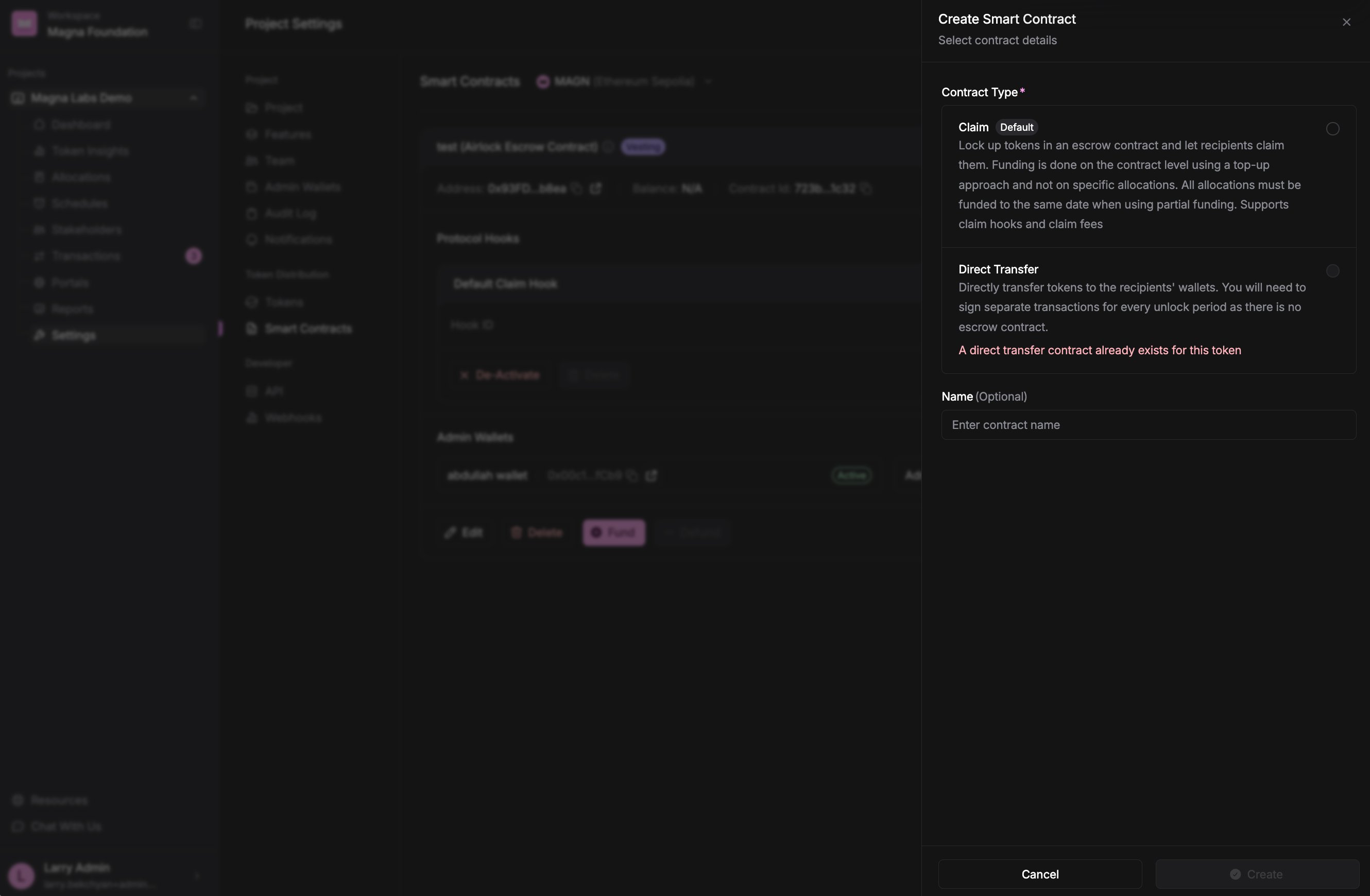 If you leave the initialize option unchecked, the contract is created but not yet on-chain — you can deploy it whenever you're ready using the steps below.
## Deploy a contract
A contract that hasn't been put on-chain shows **Not deployed** on its card, with a **Deploy** button.
1. On the contract's card, click **Deploy**.
2. In the **Deploy Smart Contract** dialog, choose the **Admin Wallet** that will be the owner of the contract.
3. Click **Create**.
If you leave the initialize option unchecked, the contract is created but not yet on-chain — you can deploy it whenever you're ready using the steps below.
## Deploy a contract
A contract that hasn't been put on-chain shows **Not deployed** on its card, with a **Deploy** button.
1. On the contract's card, click **Deploy**.
2. In the **Deploy Smart Contract** dialog, choose the **Admin Wallet** that will be the owner of the contract.
3. Click **Create**.
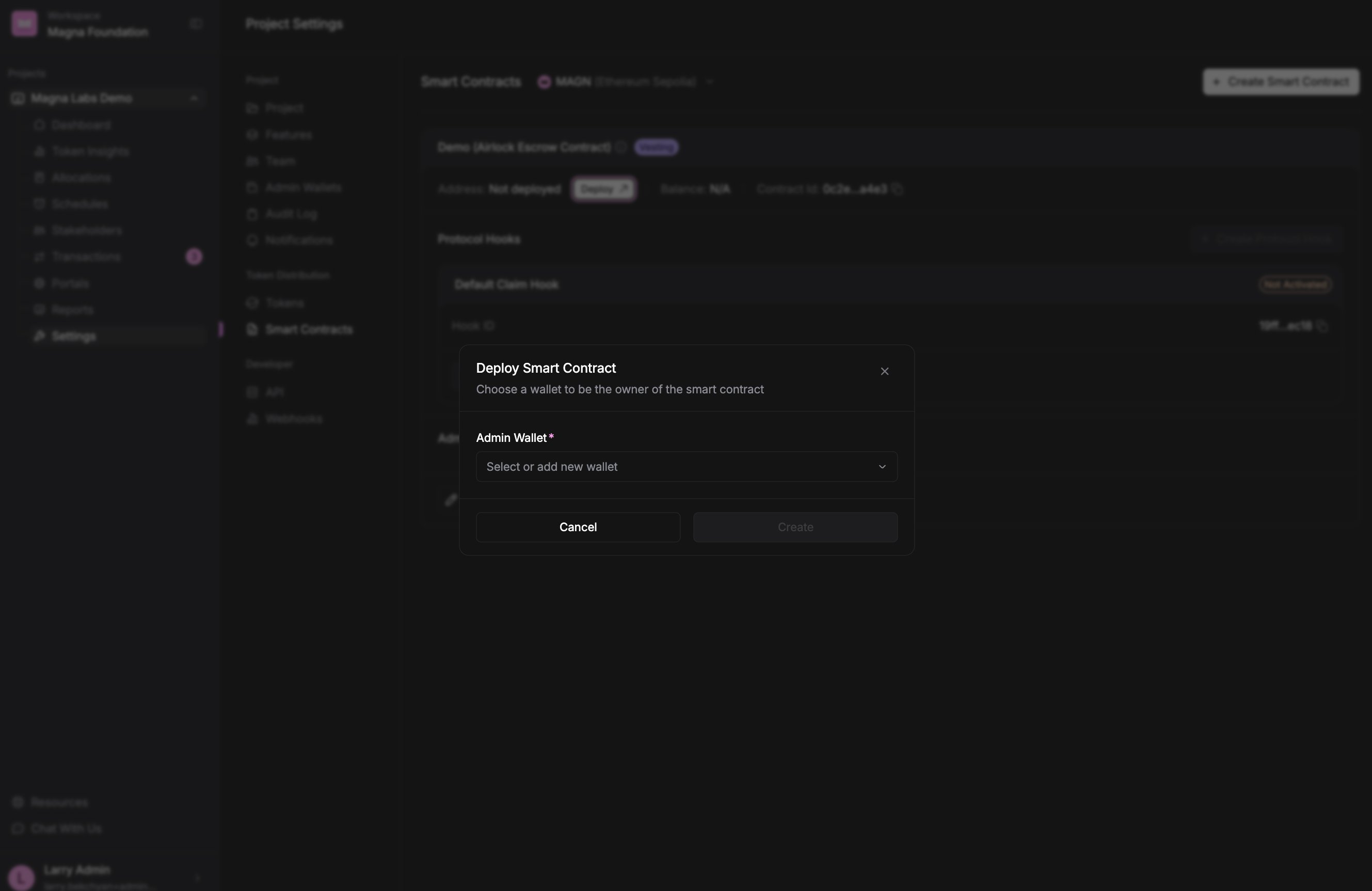 Magna creates an **Initialize Contract** transaction and takes you to its details.
## Sign the deployment
Deploying doesn't happen from the dialog — Magna prepares the on-chain transaction, and you sign it to complete the deployment.
1. Go to the **Transactions** tab.
2. Sign the **Initialize Contract** transaction with your admin wallet.
Magna creates an **Initialize Contract** transaction and takes you to its details.
## Sign the deployment
Deploying doesn't happen from the dialog — Magna prepares the on-chain transaction, and you sign it to complete the deployment.
1. Go to the **Transactions** tab.
2. Sign the **Initialize Contract** transaction with your admin wallet.
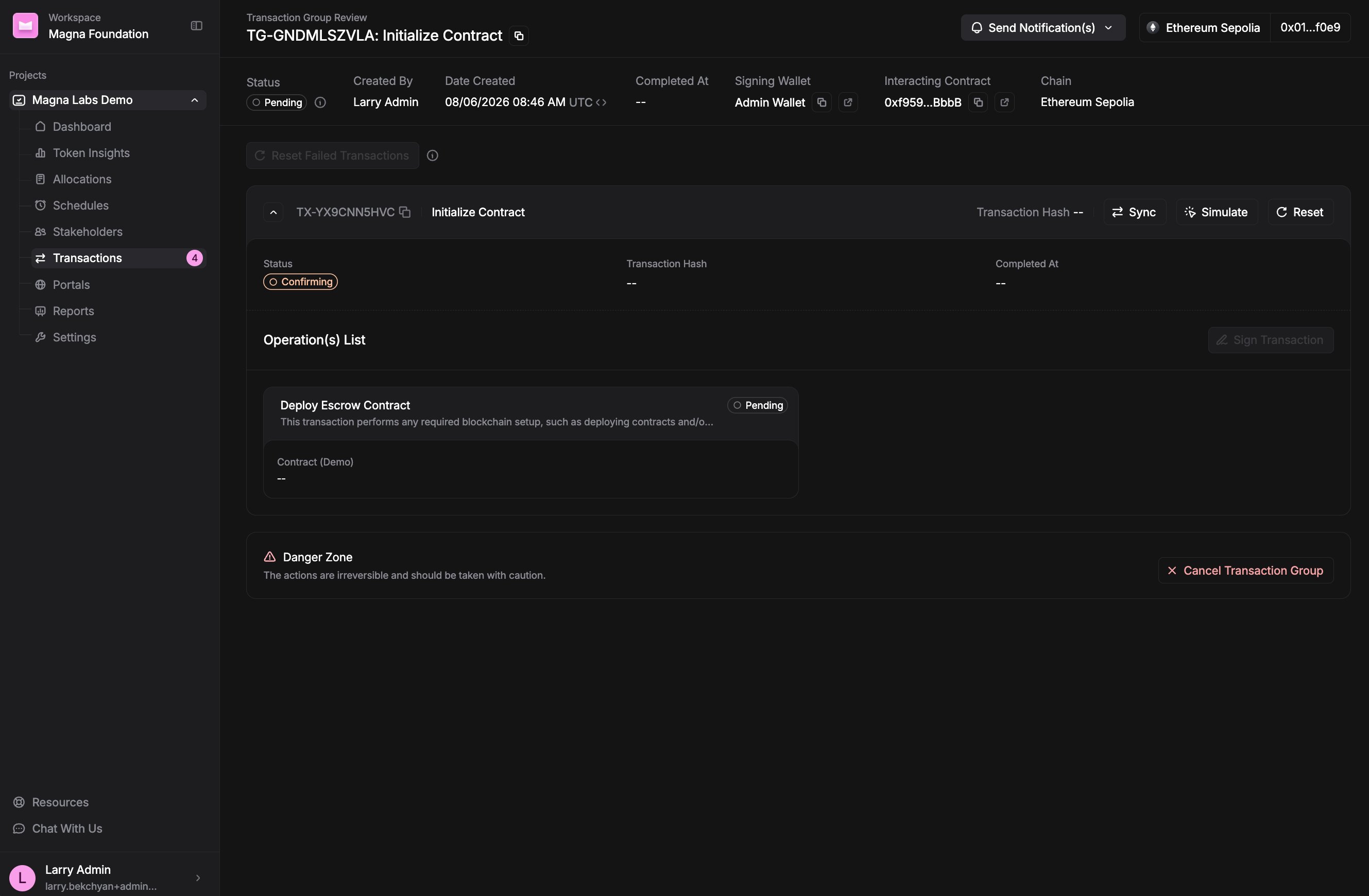 Once the Initialize transaction is signed and confirmed on-chain, the contract shows its on-chain address and is ready to be used.
The **Deploy** button is disabled while a deployment is already in progress (*"Deployment transaction is pending"*) and until the token has an on-chain address (*"Token address is required to deploy the contract"*). Make sure your token is set up before deploying.
## Next steps
* **Claim contract:** [Fund the contract](/admins/product-guides/smart-contracts/how-to-fund-a-contract) so stakeholders can claim their tokens.
* **Direct Transfer contract:** distribute tokens per unlock from the allocations flow — see [How To Fund Airdrops](/admins/product-guides/how-to-fund-allocations/how-to-fund-airdrops).
* Need to rename it later? See [How to edit a contract](/admins/product-guides/smart-contracts/how-to-edit-a-contract).
Once the Initialize transaction is signed and confirmed on-chain, the contract shows its on-chain address and is ready to be used.
The **Deploy** button is disabled while a deployment is already in progress (*"Deployment transaction is pending"*) and until the token has an on-chain address (*"Token address is required to deploy the contract"*). Make sure your token is set up before deploying.
## Next steps
* **Claim contract:** [Fund the contract](/admins/product-guides/smart-contracts/how-to-fund-a-contract) so stakeholders can claim their tokens.
* **Direct Transfer contract:** distribute tokens per unlock from the allocations flow — see [How To Fund Airdrops](/admins/product-guides/how-to-fund-allocations/how-to-fund-airdrops).
* Need to rename it later? See [How to edit a contract](/admins/product-guides/smart-contracts/how-to-edit-a-contract).